Flymap guide
Does GPS work in airplane mode?
Yes — GPS works in Airplane mode. Airplane mode switches off the radios that transmit: mobile network, Wi-Fi and Bluetooth. GPS is different — your phone only listens to signals broadcast by satellites and never sends anything back. That’s why your position can still update at 11 000 metres with every connection switched off.
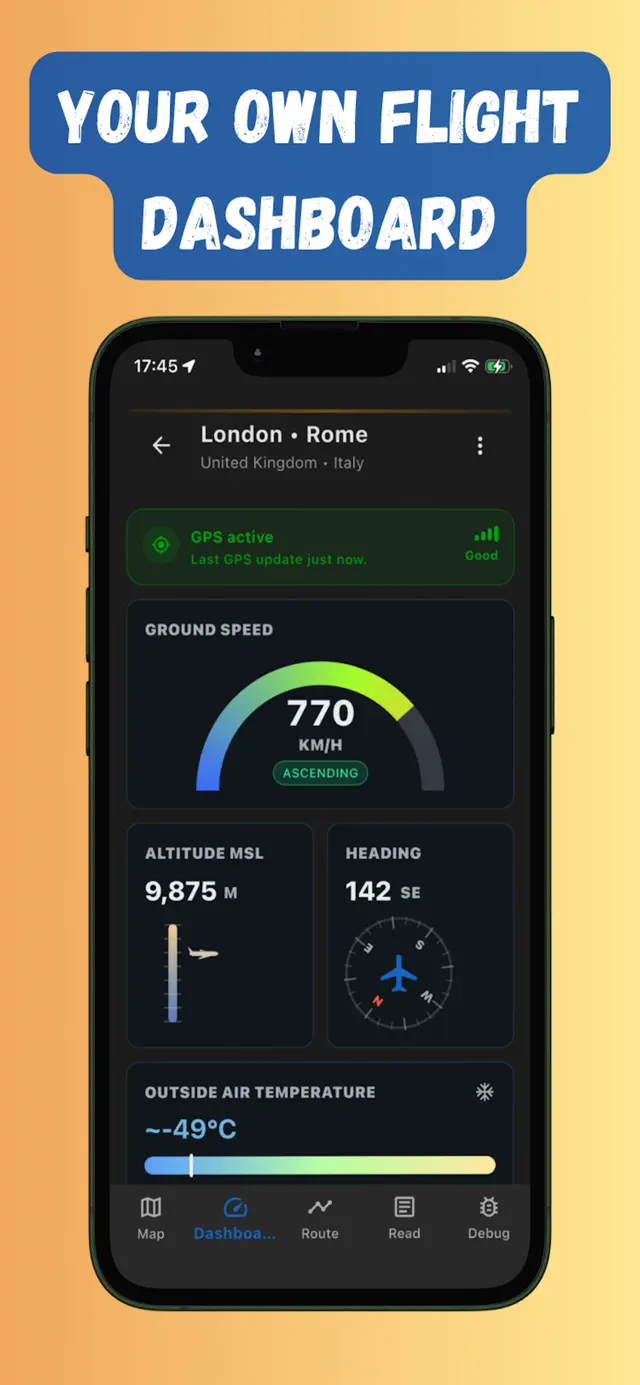
Why GPS still works when everything else is off
GPS satellites constantly broadcast timing signals. Your phone passively receives signals from several satellites at once and computes its own position from the tiny differences between them. No mobile network, no data plan and no Wi-Fi are involved — which is also why GPS works in deserts, on oceans and in planes.
The catch: GPS gives your phone coordinates, not maps. A blue dot on a blank grey grid isn’t much fun. To see where you are, the map itself must already be on your phone — that’s what an offline flight map is for.
Is using GPS allowed during a flight?
Aviation rules require you to disable transmitting radios in flight — that’s exactly what Airplane mode does. A GPS receiver doesn’t transmit, so having your position on screen is fine, the same way taking photos out the window is fine. As always, follow crew instructions during take-off and landing.
Why GPS sometimes struggles on a plane (and how to fix it)
- The fuselage blocks signal. An aluminium tube weakens satellite signals, so hold the phone near the window for the first fix.
- The first fix takes longer offline. Phones normally use assisted GPS (internet hints) to lock on within seconds. Without internet a cold start can take a minute or two by the window — after that, updates are quick.
- Wi-Fi-only tablets may have no GPS at all. Most phones and cellular iPads have real GPS chips; Wi-Fi-only iPads don’t, so use your phone instead.
Turning GPS into a flight tracker
With Flymap, you download your route’s map corridor before boarding, then flip on Airplane mode and fly. The app reads your GPS position and shows your plane moving across the offline map, along with a live dashboard — ground speed, altitude, heading — and a running answer to “what am I flying over right now?”
Frequently asked questions
Does airplane mode turn off GPS?
No. Airplane mode disables the transmitting radios — cellular, Wi-Fi and Bluetooth. The GPS receiver only listens to satellite signals, so it keeps working.
Do I need internet for GPS to work?
No. GPS positioning needs no data connection at all. Internet only speeds up the first position lock and loads map imagery — which is why offline maps matter on a plane.
Why does my map app show a blank screen on the plane?
Your GPS is probably fine — the app just can't download map tiles without internet. Download your route as an offline map before boarding and the blue dot gets a real map under it.
Does GPS tracking drain the battery?
GPS itself is fairly light, and in Airplane mode your phone saves the power it would normally spend searching for cell towers. Dim the screen and a whole flight of tracking is very manageable.
Try it on your next flight
Get Flymap free on iPhone or Android, download your route before boarding, and see what you fly over — no Wi-Fi needed.


Flymap app
Keep reading
Offline flight maps: see your whole route without internet
What an offline flight map is, why you should download one before boarding, and how to follow your whole route — no Wi-Fi, no roaming.
What am I flying over? How to identify what’s below your plane
Ways to put a name to the mysterious coastline below your window — from seatback maps to GPS apps that work in Airplane mode.
Can you use Google Maps on a plane?
What actually happens when you open Google Maps mid-flight, how far offline areas get you, and the flight-first alternative.